If you’ve ever stood in front of a 4K, seamless LED video wall at a conference center, retail store, or stadium, you might’ve found yourself wondering: can I feed different content sources to it all at once? As an LED video wall supplier, I get this question all the time—usually from business owners, event planners, or AV integrators who’re looking to upgrade their spaces without buying multiple displays or wall systems to handle different tasks. The short answer is yes, you absolutely can connect multiple sources to an LED video wall. But like most things in AV and LED tech, how you go about it depends on your needs, your space, and how you want that content to look for your audience. Let’s break this down, share what I’ve learned from years of working with customers, and clear up the confusion that usually comes with multi-source LED setups. LED Video Wall

First, let’s get one thing straight: a lot of people mix up LED video walls with regular flat-screen TVs or projectors. Flat screens are usually one display, so feeding multiple sources means you switch between them, or split a screen into two side-by-side windows. LED video walls are made up of hundreds, even thousands, of individual panels stitched together to make one huge, high-resolution display. That’s why they’re perfect for multi-source setups—we design them to be flexible, not just one-way showstoppers. But the key here is the processing hardware, not just the wall itself.
When a customer first comes to me asking about multi-source connections, I start by asking two quick questions: how many sources do you need to run at the same time, and what kind of sources are they? The most common sources people ask about are things like laptop computers (for presentations or keynote speeches), media players (for looping promotional videos or ads), live cameras (for sports, concerts, or town halls), security feeds (for retail loss prevention or office building monitoring), and even gaming consoles for events or training sessions. Each of these has different connection needs, and not every video wall can handle all of them at once.
Let’s talk about the different ways you can actually connect these sources, because that’s where most of the misinformation lives. The old way of doing things was to use a bunch of splitters and cables to send each source to the wall, but that’s clunky, causes lag if you’re running more than two or three sources, and makes the setup impossible to scale if you add more content later. Now, we use video wall controllers and matrix switchers to centralize all sources and route them to the wall. A video wall controller is basically the brain of your display—it takes all the incoming source feeds, scales them to fit the wall’s resolution, and arranges them however you want. Matrix switchers, on the other hand, handle the routing of multiple sources at once, so you can switch between them or display them side-by-side without rewiring anything.
For example, I had a client last year who runs a 10,000-square-foot retail store in a busy downtown area. They wanted their LED video wall to do three things at once: play a loop of new product ads, show live security feeds from the entrance and fitting rooms, and display a real-time social media feed of customers tagging their store. We set them up with a 16-source video wall controller and a 4K matrix switcher. That way, their marketing team can toggle between showing just the ads, or split the wall into four sections: one for ads, two for security, and one for social media. No messy cables, no lag, and they can add a new source (like a live stream of a product launch) anytime just by plugging it into the matrix. It’s been running smoothly for over a year now, and they’ve since added a training feed for their staff that they display during off-hours.
But here’s a thing to keep in mind: not all LED video walls are built the same. If you have a small, indoor wall for a coffee shop that only needs two sources (like a laptop for music videos and a menu display), a basic controller will work just fine. But if you’re setting up a wall for a stadium that needs 20+ sources (live game feeds, sponsor ads, ticker tapes, announcer graphics), you need a high-density, enterprise-grade controller that can handle those signals without any compression or loss of quality. Compression is a big red flag here—if a controller compresses a live camera feed, it’ll look blocky and blurry, which defeats the whole purpose of a high-resolution LED wall.
Another common question I get is about wireless connections. A lot of people want to feed sources like their smartphone or tablet to the video wall without running cables, especially for meetings or small events. The good news is that most modern controllers support wireless sources via HDMI-over-IP, Miracast, or Apple AirPlay. I recently worked with a small startup that uses our 8×5 LED wall for weekly team meetings. Instead of plugging each manager’s laptop into the wall every week, we set up a wireless source module that lets anyone connect from their device and share content instantly. The only catch here is that wireless sources can be prone to interference in busy spaces, so if you’re in an area with lots of Wi-Fi networks (like a convention center), you might want to add a dedicated Wi-Fi 6 access point for your AV setup to avoid lag or dropped feeds.
Now, let’s talk about the limits, because no setup is perfect. The biggest limit comes from the resolution and refresh rate of your sources vs. your LED wall. If you have a source that’s 8K resolution and your controller only supports up to 4K input, that source will have to be scaled down, which can cause a slight loss of detail. Similarly, if you’re running a high-refresh-rate source like a gaming console or live sports, you need a controller that can match that refresh rate to avoid screen tearing or motion blur. Most of our mid-range and high-end controllers support up to 8K input, so that’s not a problem for most customers, but it’s something to keep in mind if you’re planning to use fast-moving content.
Another limit is the number of sources. While you can connect dozens of sources to a video wall, you don’t want to overload it—each source takes up processing power, and if you have too many running at once, the wall might start to lag or freeze. A good rule of thumb is to only display sources that you actually need at any given time. For example, if you’re running a conference, you might only need the presenter’s laptop, a live camera of the stage, and a slide ticker. You can keep other sources (like social media or ads) in the controller’s library and toggle them in if you need them, instead of running all of them at once.
I also want to mention a common mistake that customers make when setting up multi-source walls: not accounting for display layout. Some controllers let you arrange sources in any shape—you can have a small window for a laptop in the corner, a full-screen feed for a live camera, or a split screen with four sources. But if you don’t plan your layout ahead of time, you might end up with sources that are too small to read, or windows that overlap awkwardly. My advice is to draw out your desired layout before you buy any equipment, and talk to your supplier (that’s me, by the way) about what’s possible. We can help you pick a controller that supports the layout you want, so you don’t have to go back and rework your setup later.
Let’s also touch on different use cases, because multi-source setups look totally different depending on where the wall is. For corporate offices, you might have a wall that switches between company presentations, live Zoom calls, and internal news feeds. For churches or event venues, it could be a mix of live sermon feeds, worship videos, and guest speaker laptops. For educational institutions, it might be lecture slides, lab camera feeds, and student project presentations. For retail, it’s ads, inventory data, and customer reviews. No matter the use case, the core setup is the same: centralize your sources with a controller, route them to the wall, and adjust the layout to fit your space.
One of the most interesting projects I’ve worked on lately was a sports bar that wanted their LED video wall to show three different games at once, plus a ticker of live scores and promotions for food and drinks. We used a 32-source matrix switcher and a controller that could split the 12×8 foot wall into three equal sections for the games, plus a narrow strip at the bottom for the ticker. The owners told us that since setting it up, their weekend revenue has gone up 20% because customers can watch all their favorite teams without having to switch channels. That’s the power of a multi-source LED wall—it doesn’t just display content, it enhances the experience for everyone.
Now, I want to address a question that I get all the time from people who are worried about cost. A lot of them think that connecting multiple sources to an LED video wall will double or triple their budget, but that’s not true. The controller and matrix switcher are add-ons, but for most small to medium setups, they’re relatively affordable compared to the wall itself. For example, a basic 4-source controller might add a few hundred dollars to the total cost of the wall, while a high-density enterprise controller might add a few thousand, which is worth it if you need to run a lot of sources. The key is to talk to your supplier about your exact needs, so they can recommend a setup that fits your budget, not just a one-size-fits-all system.
I should also mention maintenance, because that’s something that people often overlook. Multi-source setups are reliable, but they do need regular check-ups to make sure all the sources and controllers are working properly. We offer free annual maintenance checks for all our customers, where we test every connection, update the controller’s software, and make sure the content is displaying correctly. If you don’t have a maintenance plan, you can run into issues like a source dropping out, or a controller not scaling content properly, which can be a big problem during an event.
At the end of the day, the answer to “Can I connect multiple sources to an LED video wall?” is a resounding yes. The technology is mature enough that even small businesses can afford and use multi-source setups to make their spaces more engaging and functional. The key is to work with a supplier who understands your needs, not just sells you a wall. When you partner with someone who takes the time to ask about your content, your space, and your goals, you end up with a setup that works for you, not against you.
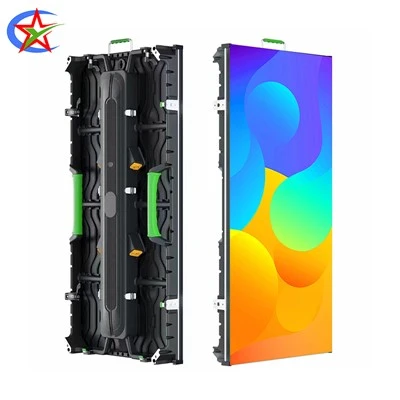
If you’re ready to upgrade your space with an LED video wall that can handle all your content sources, we’re here to help. We can walk you through every step, from picking the right wall size and resolution to choosing a controller that fits your needs and budget. Don’t settle for a wall that only shows one piece of content at a time—get a system that works as hard as you do.
Outdoor LED Module References:
- Society of Motion Picture and Television Engineers. (2021). Standards for video wall signal processing and source routing.
- LED Industry Association. (2022). Enterprise LED video wall deployment guide for multi-source setups.
- AV Technology Magazine. (2023). Best practices for multi-source LED video wall integration in commercial spaces.
- International Broadcasting Convention. (2022). High-density source switching for large-format display systems.
Shenzhen Starcolor Optoelectronics Co., Ltd.
As one of the most professional led video wall manufacturers and suppliers in China, we’re featured by quality products and good price. Please rest assured to wholesale discount led video wall in stock here from our factory. Customized orders are welcome.
Address: 2nd floor, Building A, Hongjingda Industrial Park, Shiyan town, Bao’an District, Shenzhen
E-mail: starcolorled@outlook.com
WebSite: https://www.starcolordisplay.com/
